
One account for everything at the Center
Classes, kids' programs, memberships and donations are moving to one new registration system. Here's what's changing, what you need to do, and when.
Three dates to know
-
Your account email arrives
Monday, November 30
Your info is already moved over. Just confirm it and set a password.
-
Free drop-in help at the Center
Mon to Thu, Nov 30 to Dec 3
10 AM to 4 PMStop by for help with your account, plus drinks, treats and artist demos.
-
January classes open for registration
Tuesday, December 8
Have your account ready so you can grab a spot before classes fill.
Finish your account by December 8 to be entered in our prize drawing. Prizes include a $250 Center gift certificate, two $100 gift certificates for classes and events, Center merchandise and local Sonoma experiences.
What’s getting easier
Right now, adult classes, kids’ programs, memberships and donations each live in a different system with a different login. Starting in December, they all come together in one account.
Why Amilia?
We looked at several options over the past two years, and Amilia was the one that could bring it all together. For us, it means fewer duplicate records and less paperwork, so staff can spend more time supporting our members and guests.
-
One account, one login
Classes, kids’ programs, memberships, donations and material purchases in one place. Sign in with a password, or with Google, Apple, Facebook or Microsoft.
-
The whole family together
Add your kids and partner to one family account and see everyone’s schedule in one spot.
-
One cart, one checkout
A ceramics class for you, a camp for your kids and a bag of clay, in the same order.
-
Member pricing and credits, automatically
Sign in and your member price and any credits on your account show up at checkout. You won’t need a discount code.
-
Payment Plans
Coming soon: spread the cost of many classes and programs over several payments, charged automatically.
-
Forms you fill out once
Emergency contacts, medical notes and waivers save to your account and carry over to your next registration.
-
Waitlists
If a class is full, join the waitlist and we’ll let you know when a spot opens.
-
Receipts anytime
Every registration and payment is saved in your account. Handy at tax time or for reimbursements.
-
Register from your phone
Browse, sign up and pay from the Amilia app or your phone’s browser.
-
Update your own info
Change your address, phone, email or payment method yourself, anytime.
-
Membership Discounts
No more codes at checkout required. If you’re an active member at the silver level or above, your discount will be applied automatically at checkout.
Setting up your account
If you’ve taken a class, signed a child up for a program, donated or been a member, we’ve already moved your information over. On Monday, November 30, you’ll get an email asking you to finish setting up your account. Everyone needs to do this step, even if your information is already there, because it’s where you set your password.
You can create an Amilia account on your own anytime. It just won’t bring over your information from our current systems, so if you’ve been involved with the Center before, wait for the November 30 email.
-
Step 1: Find the email
On November 30, look for an email from [email protected] about your new account. If it’s not there, check your spam or promotions folder.
The link in the email expires after 10 days, so try to finish before then. If it’s expired, call the front desk at 707-938-4626 and we’ll send a new one.
We’ll never ask for your password or card number by email, text or phone. If a message asks for either, don’t reply. Call the front desk at 707-938-4626.
-
Step 2: Choose how to sign in
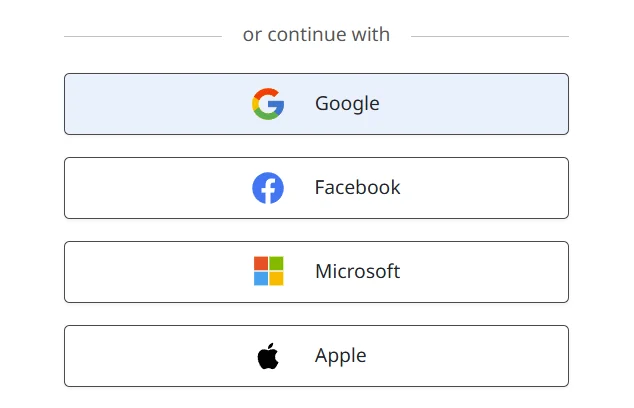
Click the link in the email. Create a password, or sign in with Google, Apple, Facebook or Microsoft. Use the same email address the invitation was sent to, so your history comes with you.
From Amilia’s help center -
Step 3: Verify your email
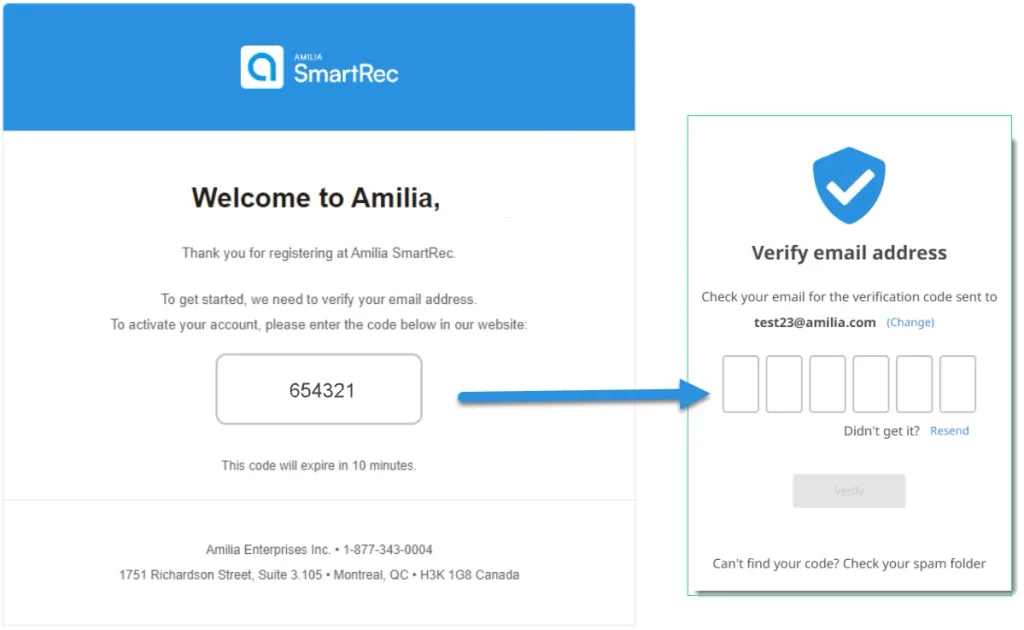
If you chose a password, you’ll get a short code by email. Enter it right away, since it expires quickly. Signing in with Google, Apple, Facebook or Microsoft skips this step.
From Amilia’s help center -
Step 4: Check your info
Look over your name, address, phone number and the people in your household. Update anything that’s out of date.
-
Step 5: Add your family
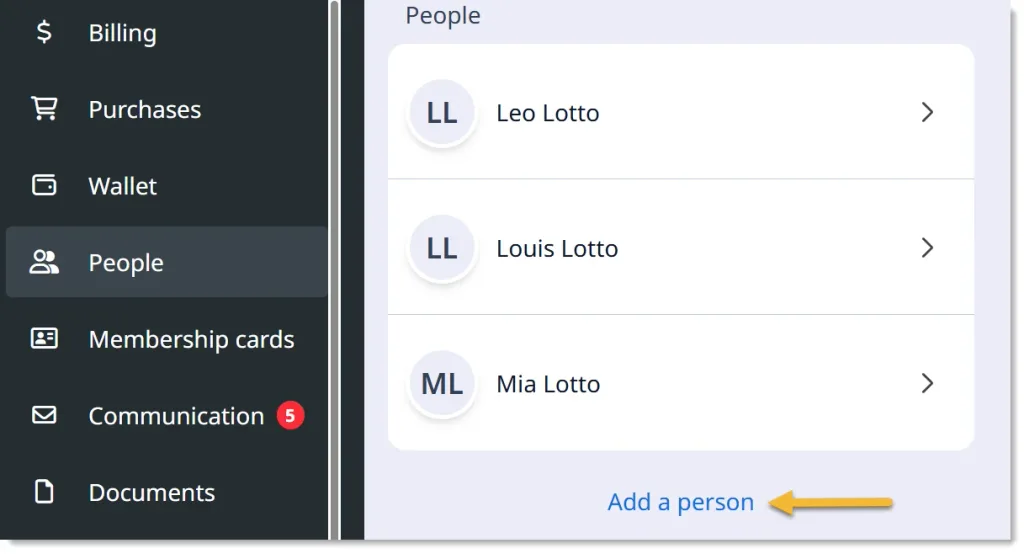
Add your children under the People tab. To give a partner or another adult their own login, open their profile and choose “Invite to join family account.” Invitations expire after 10 days.
From Amilia’s help center -
Step 6: Save a payment methodOptional
Store a card in your Wallet for faster checkout, or add one the first time you register.
-
Step 7: Get the appOptional
Download the free Amilia app for iPhone or Android to register and check your family’s schedule on the go. Your phone’s browser works too.
Your membership
comes with you
Current members don’t need to do anything extra. Once your account is set up, your member price and any credits show up automatically at checkout.
When it’s time to renew, you’ll renew right in your new account, in the same place as your classes and donations.
Membership levels and benefits aren’t changing with the switch.
Membership Discounts
No more codes at checkout required. If you’re an active member at the silver level or above, your discount will be applied automatically at checkout.
Ceramics studio members
Your studio membership is moving to the new system too, and its tiers are changing. The ceramics team will be in touch with details and timing.
Not a member yet?
Membership has its benefits. Silver and above memberships save 10% off classes over $40. See membership levels
Registering for
classes and programs
Registration for classes that start in January 2027 opens Tuesday, December 8, in the new system. Until then, keep using the registration links on our website as usual.
Already signed up for something?
It still counts. If you registered for a class that meets after December 8, we’ll move your spot to the new system for you. You won’t need to do anything or pay again.
How it works
Browse classes on our website like you do now. When you click Register, you’ll go to our new registration store. Sign in, add classes to your cart and check out once.
Kids’ programs
Camps and after-school programs move too. Sign up each child from your family account.
Clay and studio materials
Buy clay, ceramics tools and other materials through your new account too, so they’re saved with your classes and memberships.
Event tickets
Most events move to the new system. A few shows with assigned seating will stay on VBO Tickets.
Frequently asked questions
Why is the Center changing systems?
Do I have to create an account?
I didn't get the setup email. What do I do?
You can also create an account on your own. It just won’t bring over your information from our current systems.
Can I sign in with my Google or Apple account?
I already have an Amilia account from another organization. Can I use it?
Can my partner and I share an account?
How do I add my kids?
Will my member discount still work?
What happens to classes I've already registered for?
Can I pay in installments?
Is my payment information secure?
Do I have to use the app?
No. The app is optional. Everything works in a web browser on your computer, tablet or phone.
Where do I find my receipts?
Can I still make a donation?
I'm not comfortable with computers. Can someone help?
What's the prize drawing?
For anything else, call the front desk at 707-938-4626 or email [email protected].